
entry
冷蔵庫の開閉を監視して孤独死対策をする
#RaspberryPi#Python
はじめに
私のような独り暮らしで友達も恋人もいない人間は、自宅で倒れたら誰も気付かず誰も助けてくれません。
孤独死まっしぐらですね。
仕事をしていれば誰かが異変に気付いて連絡してくれるかもしれませんが、運悪く休日に倒れてしまったらもうおしまいです。
そんな悲惨な未来を回避するにはどうしたら良いか考えた結果、「24 時間以上冷蔵庫の開閉を検知しなければ家族に LINE を送信する」仕組みを作ってみました。
何をトリガーとするか
冷蔵庫は毎日 1 回は開けるはずなので、「最後に冷蔵庫を開閉してから 24 時間以内に開閉があるかどうか」を生存のトリガーとして設定しました。
最後に冷蔵庫を開閉してから 24 時間以上開閉しなければ異常事態とみなします。
一日 1 回定期実行してその間に開閉があったかを取得する方法も考えましたが、例えば定期実行後すぐに開閉してから倒れた場合異常を検知するのは約2日後になってしまうのでこの方法はやめました。
24 時間が果たして適切かは分かりませんが、外出や就寝が重なれば 20 時間ほど開閉しないとかもありえそうなので一旦はこれで運用してみることにしました。
冷蔵庫の開閉を検知する
準備するもの
リードスイッチとラズパイで冷蔵庫の開閉を検知します。
コードは MicroPython で書き込むことにしました。
以下は 1 秒ごとにドアの状態を監視し、開いていたら本体の LED を点灯し閉じていたら消灯させるコードです。
リードスイッチを Pin 14 と GND に接続し冷蔵庫のドアに設置すれば準備完了です。
import time
from machine import Pin

reed_switch = Pin(14, Pin.IN, Pin.PULL_UP)
led = Pin('LED', Pin.OUT)

def check_door_status():
    if reed_switch.value() == 1:
        print("Door is Opened")
        led.value(1)
    else:
        print("Door is Closed")
        led.value(0)

while True:
    check_door_status()
    time.sleep(1)
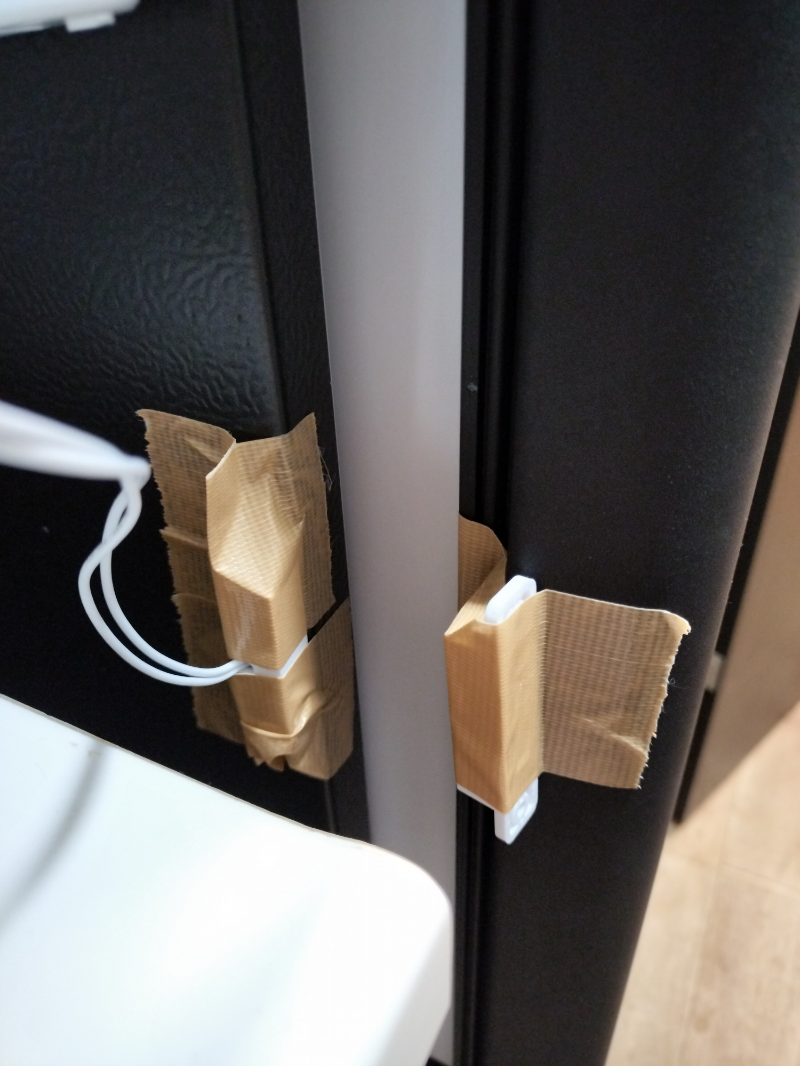
ガムテームで適当に貼り付けました。見た目は悪いですが気にしません。
最後に開閉してから何分経ったかを監視する
最後に開けた時間をグローバル変数に保存しておき、現在時刻からどれくらい経過したかをチェックします。
ついでに開けっ放しのまま 5 分経過したら通知する機能も実装しました。 (本当はこれがやりたかっただけです)
私の冷蔵庫はポンコツで、冷凍庫を閉めた勢いで冷蔵庫のドアも開いてしまうことがあります。
import time
from machine import Pin

reed_switch = Pin(14, Pin.IN, Pin.PULL_UP)
led = Pin('LED', Pin.OUT)

last_open_time: float = time.time()
is_opened: bool = False
is_emergency_notified: bool = False
is_left_open_notified: bool = False

# 24h
emergency_time: float = 60 * 60 * 24
# 5m
left_open_time: float = 60 * 5

def check_door_status():
    global last_open_time, is_opened, is_left_open_notified, is_emergency_notified
    if reed_switch.value() == 1:
        print("Door is Opened")
        led.value(1)
        if not is_opened:
            is_opened = True
            is_left_open_notified = False
            is_emergency_notified = False
            last_open_time = time.time()
    else:
        print("Door is Closed")
        led.value(0)
        if is_opened:
            is_opened = False
            is_left_open_notified = False

def check_left_open():
    global last_open_time, is_opened, is_left_open_notified
    current_time: float = time.time()
    elapsed_time: float = current_time - last_open_time
    if is_opened and not is_left_open_notified and elapsed_time > left_open_time:
        print("Door is left open")
        is_left_open_notified = True

def check_emergency():
    global last_open_time, is_opened, is_emergency_notified
    current_time: float = time.time()
    elapsed_time: float = current_time - last_open_time
    if not is_emergency_notified and elapsed_time > emergency_time:
        print("Emergency")
        is_emergency_notified = True

while True:
    check_door_status()
    check_left_open()
    check_emergency()
    time.sleep(1)
LINE 通知機能を実装する
Wi-Fi に接続する
LINE 通知をする前にインターネットに接続する必要があります。
Raspberry Pi Pico W は無線 LAN に対応しているので無線で接続します。
import network

SSID = "SSID"
PASSWORD = "password"

def connect_wifi(ssid, password):
    wlan = network.WLAN(network.STA_IF)
    wlan.active(True)
    wlan.connect(ssid, password)

    print('Connecting to Wi-Fi...')
    while not wlan.isconnected():
        time.sleep(1)
        print('Connecting...')

    print('Wi-Fi connected:', wlan.ifconfig())

connect_wifi(SSID, PASSWORD)
LINE Bot を作成する
Bot を作成するために LINE Developers にログインします。
Messaging API を有効にするには LINE ビジネス ID が必要になったようなので登録しました。
詳しい手順は以下を参照ください。
https://developers.line.biz/ja/docs/messaging-api/getting-started/
LINE メッセージを送信する
Messaging API を使用して Bot からメッセージを送信します。
LINE_TOKEN にはチャネルアクセストークン、LINE_TO_ID には自分のユーザー ID を設定します。
それぞれ Bot の管理画面から取得することができます。
import urequests
import ujson

LINE_API_URL = "https://api.line.me/v2/bot/message/push"
LINE_TOKEN = "Bearer XxXxXxXx"
LINE_TO_ID = "XxXxXxXx"

def send_line_message(to, message):
    headers = {
        "Content-Type": "application/json",
        "Authorization": LINE_TOKEN
    }
    data = {
        "to": to,
        "messages": [
            {
                "type": "text",
                "text": message
            },
        ]
    }
    try:
        response = urequests.post(LINE_API_URL, headers=headers, data=ujson.dumps(data).encode('utf-8'))
        print(f"Response: {response.text}")
    except Exception as e:
        print(f"API Request Error: {e}")
これで自分自身にメッセージを送信できましたが、今回の性質上自分に送信しても意味がありません。
グループ LINE に対してメッセージを送信する
LINE_TO_ID にグループ ID を設定すれば良いのですが、これが少し面倒です。
グループ ID は Webhook 経由でしか取得することができないので、それ用のサーバを実装する必要があります。
私は Cloudflare Workers で適当に実装しました。
全てブラウザ上で完結するので非常に楽ですね…
export default {
  async fetch(request, env, ctx) {
    if (request.method === "POST") {
      try {
        const requestBody = await request.json();
        console.log("Webhook received:", requestBody);
        return new Response("Webhook received successfully", {
          status: 200,
          headers: { "Content-Type": "text/plain" },
        });
      } catch (err) {
        console.error("Error processing request:", err);
        return new Response("Invalid JSON data", { status: 400 });
      }
    } else {
      return new Response("Only POST requests are allowed", { status: 405 });
    }
  },
};
デプロイしたら Webhook の URL として設定し、グループに Bot を追加します。
グループへの追加をトリガーとしてレスポンスからグループ ID を取得することができます。
完成
必要な情報が揃ったので、あとはこれらのコードを組み合わせるだけです。
冷蔵庫が開けっ放しのときは自分に通知し、緊急事態のときは家族のグループ LINE に通知するようにしました。
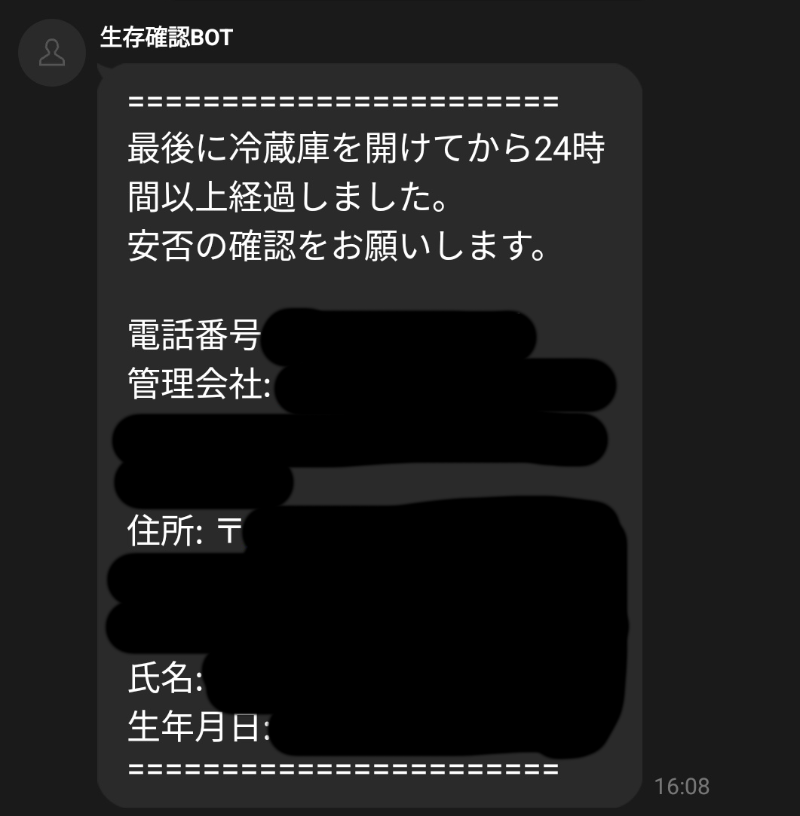
また、すぐに連絡できるよう自分や管理会社の電話番号などを記載してみました。
import time
from machine import Pin
import network
import urequests
import ujson

SSID = "SSID"
PASSWORD = "password"
LINE_API_URL = "https://api.line.me/v2/bot/message/push"
LINE_TOKEN = "Bearer XxXxXxXx"
LINE_TO_GROUP_ID = "XxXxXxXx"
LINE_TO_USER_ID = "XxXxXxXx"

emergency_message = """=======================
最後に冷蔵庫を開けてから24時間以上経過しました。
安否の確認をお願いします。

電話番号:
管理会社:
住所:
氏名:
生年月日:
======================="""

reed_switch = Pin(14, Pin.IN, Pin.PULL_UP)
led = Pin('LED', Pin.OUT)

last_open_time: float = time.time()
is_opened: bool = False
is_emergency_notified: bool = False
is_left_open_notified: bool = False

# 24h
emergency_time: float = 60 * 60 * 24
# 5m
left_open_time: float = 60 * 5

def check_door_status():
    global last_open_time, is_opened, is_left_open_notified, is_emergency_notified
    if reed_switch.value() == 1:
        print("Door is Opened")
        led.value(1)
        if not is_opened:
            is_opened = True
            is_left_open_notified = False
            is_emergency_notified = False
            last_open_time = time.time()
    else:
        print("Door is Closed")
        led.value(0)
        if is_opened:
            is_opened = False
            is_left_open_notified = False

def check_left_open():
    global last_open_time, is_opened, is_left_open_notified
    current_time: float = time.time()
    elapsed_time: float = current_time - last_open_time
    if is_opened and not is_left_open_notified and elapsed_time > left_open_time:
        print("Door is left open")
        send_line_message(LINE_TO_USER_ID, "冷蔵庫が開けっ放しです!")
        is_left_open_notified = True

def check_emergency():
    global last_open_time, is_opened, is_emergency_notified
    current_time: float = time.time()
    elapsed_time: float = current_time - last_open_time
    if not is_emergency_notified and elapsed_time > emergency_time:
        print("Emergency")
        send_line_message(LINE_TO_GROUP_ID, emergency_message)
        is_emergency_notified = True

def connect_wifi(ssid, password):
    wlan = network.WLAN(network.STA_IF)
    wlan.active(True)
    wlan.connect(ssid, password)

    print('Connecting to Wi-Fi...')
    while not wlan.isconnected():
        time.sleep(1)
        print('Connecting...')

    print('Wi-Fi connected:', wlan.ifconfig())

def send_line_message(to: str, message: str):
    headers = {
        "Content-Type": "application/json",
        "Authorization": LINE_TOKEN
    }
    data = {
        "to": to,
        "messages": [
            {
                "type": "text",
                "text": message
            },
        ]
    }
    try:
        response = urequests.post(LINE_API_URL, headers=headers, data=ujson.dumps(data).encode('utf-8'))
        print(f"Response: {response.text}")
    except Exception as e:
        print(f"API Request Error: {e}")

connect_wifi(SSID, PASSWORD)

while True:
    check_door_status()
    check_left_open()
    check_emergency()
    time.sleep(1)
終わり
実際運用するとなると旅行時などイレギュラーなケースには対応できません。
まあその辺は事前に伝えておき、家族とコミュニケーションを取るきっかけにでもなれば良いですね。